

Signal 01
Application logs
Pino writes every sanitized event to stdout first, then makes an asynchronous OTLP copy for Loki when a collector is configured.
PINO → STDOUT + LOKI

PayLens / engineering
A technical walkthrough of the product decisions, performance work, security model, and deployment topology behind PayLens.
 Next.js 16
 NestJS 12
 PostgreSQL
 Redis / BullMQ
 Cloudflare R2 · OpenTelemetry
Fast path
Production endpoints and source repositories, grouped for a short review.
LIVE
Live application
DESIGN SYSTEM / COMPONENTS
Component showcase
API
Backend
API DOCS
Swagger / OpenAPI
SOURCE
Frontend source
SOURCE
Backend source
DATASET
10k demo CSV
Reviewer demo · email verified
Intentionally public evaluation workspace — do not store real or sensitive information in this tenant. The same credentials can be populated directly from the login screen using “Use Demo Account”.
Synthetic / demo data
A ready-to-import synthetic technology-company workforce for reviewing the full import, directory, search, and export path.
Synthetic technology-company workforce
Sign in with the reviewer demo account above, then import this file into Demo Company to quickly populate PayLens for evaluation. The dataset contains synthetic names and @novastack.example email addresses; it is for product evaluation only and does not send external email. The demo seed itself never prepopulates employees — the import is the product workflow under review.
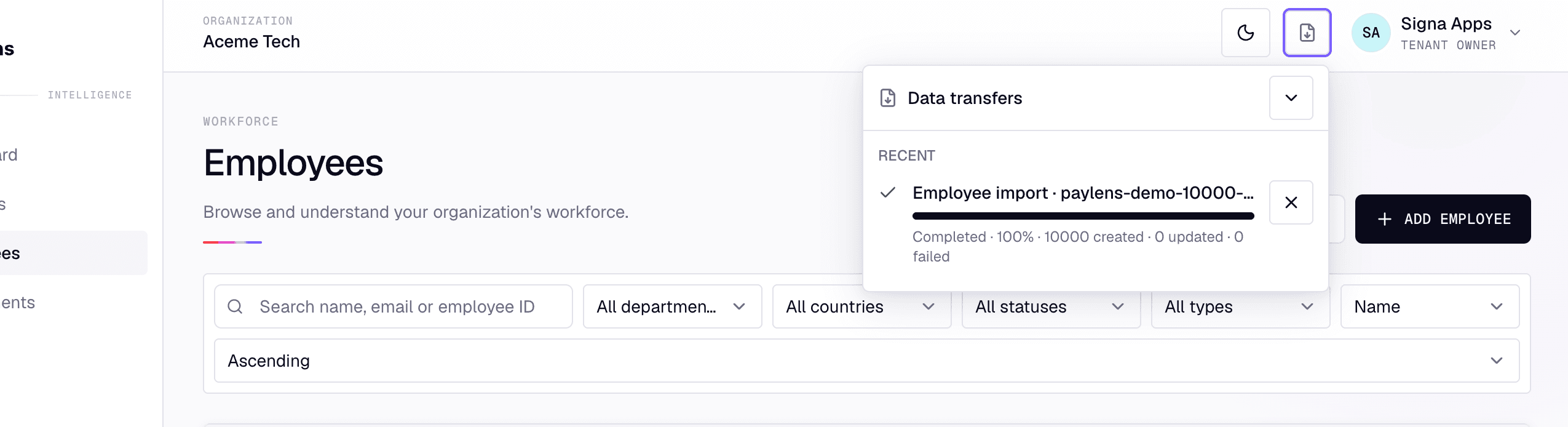
The import file intentionally has no Organization ID. PayLens never trusts CSV data to choose a tenant: the authenticated session and active organization determine where imported employees belong.
Authenticated user → active Membership → active Organization → uploaded Employee data
System shape
Frontend and backend are independently deployed applications connected through a versioned REST API and secure cookies.
Browser
React client and secure cookie session

Next.js frontend
App Router, React Query, Zustand
NestJS API
REST, RBAC, business modules


PostgreSQL / Prisma


Redis / BullMQ workers

R2 via FileStorageService


OIDC, SMTP, OpenAI, OTLP
The browser calls the NestJS API over REST. PostgreSQL owns durable relational state; Redis and BullMQ carry background transfer work; a provider-neutral storage boundary currently targets Cloudflare R2.
Signals without coupling
OpenTelemetry is optional: PayLens keeps serving requests and Pino keeps writing to stdout when the collector, Loki, Tempo, Prometheus, or Grafana is unavailable.
Signal 01
Application logs
Pino writes every sanitized event to stdout first, then makes an asynchronous OTLP copy for Loki when a collector is configured.
PINO → STDOUT + LOKI

Signal 02
Distributed traces
HTTP, service, Prisma, Redis, BullMQ, and SMTP spans travel through OTLP to Tempo with trace correlation preserved.
OTEL → TEMPO

Signal 03
Service metrics
HTTP count, error, and duration metrics reach the collector. Prometheus scrapes its exporter; Grafana turns them into dashboards and alerts.
OTEL → PROMETHEUS
ONE OPTIONAL OTLP CONNECTION
PAYLENS API → OTLP / 4318 → COLLECTOR → LOKI · TEMPO · PROMETHEUS → GRAFANA
01 · Point PayLens at the collector
Deploy an OpenTelemetry Collector reachable from the API and give it its OTLP HTTP endpoint. This is the only PayLens telemetry setting required for traces, metrics, and the secondary log sink.
OTEL_EXPORTER_OTLP_ENDPOINT=http://otel-collector:4318
02 · Route and visualize the signals
4318 and export logs to Loki and traces to Tempo./metrics scrape endpoint.requestIdor traceId, then open its Tempo trace or Prometheus chart.Failure isolation: OTLP uses bounded asynchronous batches with timeouts. A full queue or unreachable collector may drop only the remote copy and produces throttled diagnostics; it never blocks HTTP, seed execution, or terminal logging. Secrets are sanitized before either sink receives an event.
Product surface
Organizations, active membership roles, secure switching, credential auth, verification, recovery, and Google OIDC.
Tenant-scoped employee directory, departments, profiles, and guarded CRUD.
Current pay, effective-dated history, decimal precision, audit timeline, idempotent retries, and version conflict protection.
CSV/XLSX import and export through background jobs, review/apply, pause/resume/cancel, and private artifacts.
Tools with intent
The stack favors one durable tool per responsibility rather than a broad dependency collection.
Frontend
App Router and TypeScript provide the product shell; React Query makes server state authoritative; Zustand holds small client-only concerns; Axios owns HTTP; Radix/Tailwind/Lucide keep accessible primitives consistent.
Component system
The internal PayLens showcase validates reusable primitives, theme states, typography, controls, surfaces, and feedback patterns so product screens do not drift into one-off styling.
Explore the PayLens Component ShowcaseBackend
NodeNext ESM NestJS modules provide REST and Swagger. Prisma 6.19 maps relational state. Redis/ioredis/BullMQ run asynchronous work. Pino plus OpenTelemetry preserve observability without coupling request success to telemetry.
ExcelJS and CSV parsers handle interchange; Argon2id, secure cookies, Helmet, throttling, and Google OIDC support protected access.
Advisory intelligence
Used only during Employee Import to suggest mappings for unresolved Department labels after deterministic matching is exhausted. It is not tenant authority and never writes employee data directly.
Invite member flow
Open Members in the active workspace.
Choose Invite member and assign a role.
PayLens sends the recipient an invitation link.
Recipient signs in or creates an account, then accepts.
A scoped Organization Membership grants the chosen role.
This is optional for a reviewer, but it demonstrates that PayLens is genuinely multi-user and tenant-scoped—not a single-user employee database.
Multi-user workspace
A workforce record and a person who can sign in are deliberately separate concepts.
An Employee is workforce data. A workspace User and OrganizationMembership represent a trusted collaborator who can sign in and manage that organization. Importing 10,000 Employees never creates 10,000 login accounts.
An organization administrator can invite an HR administrator, HR manager, or another organization administrator. The recipient authenticates or creates an account, accepts the invitation, receives an OrganizationMembership, and their role determines access.
Organization admin → invitation → recipient auth → acceptance → membership → role-based access
Performance decisions
Decision: A tenant predicate precedes employee prefix search, using PostgreSQL functional B-tree and text_pattern_ops indexes where appropriate.
Impact: Search stays scoped and predictable as the directory grows.
Decision: Directory and history navigation use cursors rather than a growing OFFSET scan.
Impact: Stable large-data traversal without offset cost growth.
Decision: Import/export workers use fixed batches, batched employee-number/email lookup maps, sequential NDJSON parts, and durable checkpoints.
Impact: No unbounded row memory or per-row lookup loop.
Decision: BullMQ runs long CSV/XLSX work outside requests. Database state points to normalized R2 chunks before streamed final artifact generation.
Impact: Pause, retry, resume, and worker restart resilience without large Redis payloads.
Decision: Money crosses the API as decimal strings, persists as Decimal(19,2), and is handled with BigNumber on the client.
Impact: No JavaScript floating-point salary arithmetic.
Decision: React Query refetches jobs and entities after navigation or refresh; local UI state is never the transfer lifecycle source of truth.
Impact: Reliable recovery and less stale client state.
Boundary first
The active membership and active organization are server-side authority. Client-supplied organization identity never grants access.
Employee, Department, Compensation, Import, and Export access is scoped to the active organization.
Role checks operate on the active membership; secure cookie sessions rotate and revoke safely.
The bucket remains private. Requester-and-tenant scoped records issue short-lived signed upload/download URLs.
Advisory only
OpenAI is optional, advisory intelligence for the narrow case where deterministic Department matching cannot confidently resolve a human-entered label.
For example, Engg can be suggested as the tenant’s existing Engineering Department. PayLens normalizes the label and attempts an exact tenant-scoped match first; only unresolved or ambiguous Department labels and relevant existing Department names may be sent for a suggestion. Employee names, emails, numbers, compensation data, and complete CSV/XLSX files are not required for this task.
The suggestion appears in import review. User-approved validation resolves the final Department, and the apply phase uses that approved mapping. OpenAI does not select a tenant and does not directly mutate the database.
Imported Department label
Normalize + exact tenant match
OpenAI advisory suggestion only when unresolved
Review / resolve existing or new Department
Apply approved import
Deterministic first: exact normalized matches are cheaper, reproducible, lower latency, easier to test, and do not need an LLM.
Fail-soft by design: OPENAI_API_KEY is optional. If it is disabled, unavailable, times out, or returns unusable output, validation continues and unresolved mappings stay visible for manual resolution or creation.
Privacy boundary: PayLens does not expose employee personal data to OpenAI. It does not send employee names, work emails, employee numbers, compensation data, or complete CSV/XLSX files. Department-name suggestions need only unresolved Department labels and relevant existing Department names.
The advisory model is configurable through OPENAI_MODEL; no key or fixed model name is published here.
Scope discipline
Resource-oriented contracts and Swagger already fit the scope.
The operational distribution tax is not justified; workers can separate later.
Retries, pause/resume, and background jobs fit Redis/BullMQ directly.
Human-scale transfer progress works reliably with short React Query polling.
Tenant-scoped prefix search is well served by indexed Postgres.
Cross-currency salary aggregation would be misleading without a rate model.
Normalized tenant matches are reproducible and inexpensive. OpenAI is an optional advisory fallback for ambiguous Department labels; sending every import row to an LLM would add cost, latency, data exposure, and an unnecessary external dependency.
Independent deployables
Frontend
A separate non-root Node 22 bookworm-slim image runs the Next standalone output on port 3000. NEXT_PUBLIC_API_BASE_URL is a build-time public value.
Backend
A separate non-root Node 24 bookworm-slim image runs compiled NestJS on port 4000. Its entrypoint applies checked-in Prisma migrations before boot; PostgreSQL and Redis stay external. The OpenTelemetry loader is active.
Safe configuration
Frontend
NEXT_PUBLIC_API_BASE_URL is the browser-reachable API base including /api/v1. It is build-time and public: never put secrets in NEXT_PUBLIC_*.
NEXT_PUBLIC_API_BASE_URL=http://localhost:4000/api/v1
| Variable | Purpose | Contract | Safe example |
|---|---|---|---|
| NODE_ENV / PORT | Runtime mode and HTTP port | Required | production / 4000 |
| DATABASE_URL | PostgreSQL connection string | SECRET · required | postgresql://user:***@host/db |
| REDIS_URL | Redis and BullMQ connection | SECRET · required | redis://host:6379 |
| FRONTEND_URL | Allowed browser origin | Required | https://paylens.shiplogly.com |
| AUTH_ACCESS_TOKEN_SECRET | Session/JWT signing authority | SECRET · required | 32+ character placeholder |
| AUTH_COOKIE_SAME_SITE | Cookie cross-site policy | Optional | lax |
| SMTP_URL / EMAIL_FROM | Production transactional email | SMTP_URL SECRET · production required | smtps://user:***@smtp |
| GOOGLE_CLIENT_ID / SECRET / CALLBACK | Google OIDC, all-or-none | Secret group · optional | https://api.example.com/api/v1/auth/google/callback |
| OTEL_EXPORTER_OTLP_ENDPOINT | Optional telemetry collector | Optional | http://localhost:4318 |
| FILE_STORAGE_* | Private S3-compatible artifacts | Endpoint/key/secret/bucket all-or-none; production required | https://storage.example.com |
| OPENAI_API_KEY | Enables optional AI-assisted Department mapping during Employee Import | SECRET · optional | *** |
| OPENAI_MODEL | Selects the advisory mapping model | Configuration · optional | Configured by deployment |
| SEED_REVIEWER_DEMO | Enables the public reviewer demo account bootstrap during deployment | Boolean · default false · not a secret | false |
| REVIEWER_DEMO_PASSWORD | Password hashed into the reviewer demo User; required when SEED_REVIEWER_DEMO is true | Credential · disclosed to reviewers on this page | ThereWeGoAgain@123 |
Reproducible setup
Prerequisites: Git, npm, PostgreSQL, Redis, and preferably Node 22 for frontend / Node 24 for backend.
Backend
git clone https://github.com/nandymandy1/paylens-server.git
cd paylens-server
npm ci
cp .env.example .env
npm run prisma:generate
npm run prisma:migrate
npm run seed
npm run dev
Configure DATABASE_URL, REDIS_URL, FRONTEND_URL, and a 32+ character auth secret. SMTP is optional locally; file storage is needed only when testing transfers.
Frontend
git clone https://github.com/nandymandy1/paylens-app.git
cd paylens-app
npm ci
cp .env.example .env.local
# NEXT_PUBLIC_API_BASE_URL=http://localhost:4000/api/v1
npm run dev
Open http://localhost:3000. Swagger is available locally at http://localhost:4000/api/docs.
Confidence
Frontend gates
npm run format:check
npm run lint
npm run typecheck
npm run test
npm run build
Backend gates
npm run format:check
npm run lint
npm run typecheck
npm run prisma:validate
npm run test
npm run test:integration
npm run test:e2e
npm run build
Prisma migrations are checked in and deployment uses prisma migrate deploy, never db push. The narrow reviewer bootstrap (seed:reviewer-demo) may run on boot when explicitly enabled; the full engineering seed (seed, seed:verify, seed:rollback) exercises multi-tenancy, large employee directories, departments, and safe demo flows without publishing account credentials.
CLI demo data
SEED-R1 creates a deterministic local evaluation dataset. It is intentionally refused when NODE_ENV is production.
Create and verify
# In paylens-server; never use NODE_ENV=production
export SEED_DEMO_PASSWORD='choose-a-local-demo-password'
npm run prisma:migrate
npm run seed
npm run seed:verify
The canonical paylens-demo workspace receives 10,000 employees and 16 Departments. The full deterministic seed also includes 30 organizations and 35 controlled portal users for realistic multi-tenant review.
Remove only SEED-R1 data
# In paylens-server
npm run seed:rollback
This is not a database reset. It removes only deterministic SEED-R1-owned rows; foreign rows or reserved-namespace collisions fail the operation safely rather than being deleted.
Stable generated IDs, a fixed as-of date, ownership checks, and reconcile-on-rerun behavior.
Employees, compensation, history, reconciliation, and rollback use 500-row batches.
Each phase and batch emits timing spans; verification checks expected rows and a fingerprint.
Sessions are blocked and revoked, then history → compensation → employees → departments → memberships/users → organizations.
Rollback deletes high-volume rows in 500-row bounded batches, checks that each major phase is empty before continuing, and does not wrap the entire deletion in one giant transaction. The advisory lock prevents a seed and rollback from running together.
A · Reviewer account bootstrap
npm run seed:reviewer-demo creates only Demo Company, the verified Demo User, and the owner membership. It is create-once and idempotent: reruns never touch reviewer workspace data. The assessment deployment runs it automatically through SEED_REVIEWER_DEMO=true.
B · Engineering local dataset
npm run seed builds the full deterministic development and test dataset (30 organizations, 10,000 employees). It remains blocked from NODE_ENV=production and never runs during deployment.
Reviewer path
Builder

Full-stack and platform engineer focused on backend systems, product infrastructure, distributed workloads, product implementation, developer education, and media/localization experimentation.
Beyond PayLens
Engineering / products
Customer feedback and product-operations platform combining bug reporting, feature requests, changelog/reactions, and automatic technical context capture.
Visit SignalogEngineering / products
Industrial infrastructure and resource-intelligence work spanning water, air, gas, electricity, steam, telemetry ingestion, integrations, automation, visualization, and edge workflows.
Visit I-DACSMedia / localization
A media/localization platform exploring Hindi-language adaptation, multilingual audiences, creator partnerships, content production workflows, and distribution operations.
Visit From NetworksMedia / education
Programming-focused YouTube channel publishing software development tutorials and technical educational content.
Watch The CodebookPayLens engineering
 GitHub Profile